
앱 & 도구
웹브라우저 외에도 다양한 방법으로 file.kiwi를 사용할 수 있습니다.
윈도우 앱 — 탐색기에서 우클릭 한 번으로 파일 공유
크롬 확장프로그램 — 글쓰기 창 어디서든 원클릭 파일 첨부
디스코드 봇 — 디스코드에서 용량 제한 없이 파일 전송
MCP 서버 — AI에게 맡기는 파일 업로드 & 링크 생성
터미널 (CLI) — 명령어 한 줄로 파일 공유
윈도우 앱
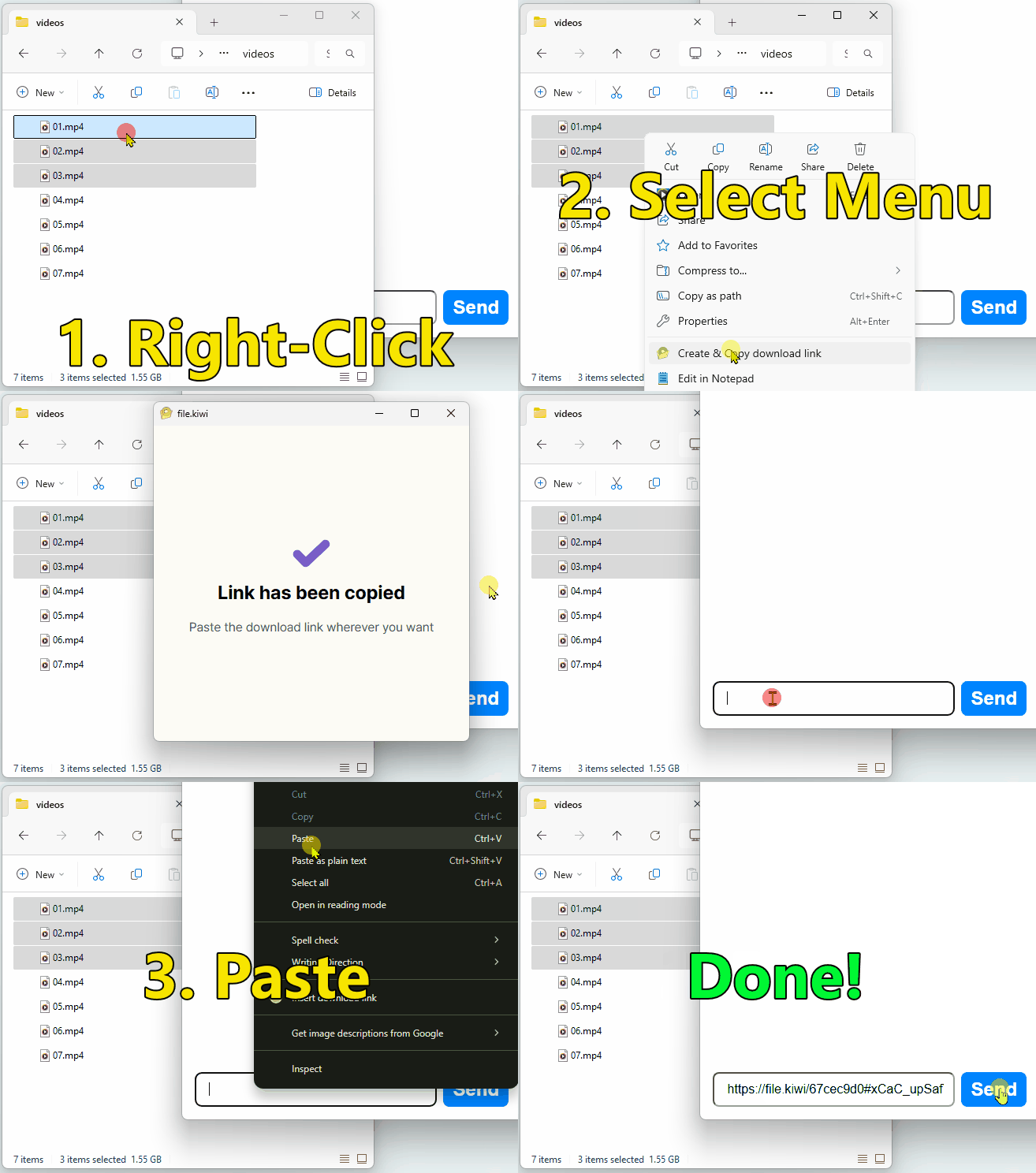
파일 탐색기에서 파일을 선택하고 우클릭하면 자동으로 업로드되고, 다운로드 링크가 클립보드에 복사됩니다. 이메일이나 메신저에 바로 붙여넣기만 하면 끝입니다.
아래 버튼을 클릭해서 설치하세요.

사용 방법
- 파일 탐색기에서 공유할 파일 선택 후 우클릭
- 자동으로 업로드 시작 → 다운로드 링크가 클립보드에 복사됨
- 이메일·메신저에 붙여넣기
file.kiwi에 접속하거나 업로드 완료를 기다릴 필요가 없습니다. 파일 크기와 무관하게 동일하게 작동합니다.
크롬 확장프로그램
이메일, SNS, 블로그, 게시판 등 텍스트를 입력할 수 있는 곳이라면 어디서든 file.kiwi 웹폴더 링크를 바로 삽입할 수 있습니다.
사용 방법
- 링크를 넣고 싶은 입력 영역에서 마우스 우클릭
- [웹폴더 첨부] 메뉴 클릭
- 파일 선택 → 업로드 시작과 동시에 링크가 자동 삽입됨
업로드가 완료되기 전에도 상대방이 즉시 다운로드를 시작할 수 있습니다. 아무리 큰 파일도 대기시간 0초로 전달됩니다.
Microsoft Edge를 포함한 Chromium 기반 브라우저에서 사용할 수 있습니다.
디스코드 봇
디스코드는 기본적으로 10MB 이상 파일 전송이 불가능합니다. file.kiwi 디스코드 봇을 설치하면 용량 제한 없이 파일을 공유할 수 있습니다.
사용 방법
- 아래 링크에서 봇 설치 (Add to My Apps 또는 Add to Server 선택)
- 채팅창에
/file-send입력 - 나타나는 링크를 클릭해 파일 선택 → 바로 공유 가능
명령어 입력부터 다운로드 링크 생성까지 10초면 됩니다. 1MB부터 50GB 영상 파일까지 동일하게 작동합니다.
설치 없이 바로 테스트해보고 싶다면 file.kiwi 디스코드 서버에서 직접 사용해볼 수 있습니다.
MCP 서버
Claude, Cursor 등 MCP를 지원하는 AI 도구에 file.kiwi MCP 서버를 연결하면, AI에게 “이 파일 공유해줘”라고 말하는 것만으로 자동으로 업로드하고 다운로드 링크를 받아올 수 있습니다.
업로드가 시작되는 즉시 다운로드 링크가 생성됩니다. 대용량 파일도 완료를 기다리지 않고 링크를 바로 공유할 수 있습니다.
설치 방법
사용 예시
연결 후 AI에게 자연어로 요청하면 됩니다.
- “C:\Users\me\report.pdf 이 파일 공유해줘”
- “presentation.pptx 다운로드 링크 만들어줘”
터미널 (CLI)
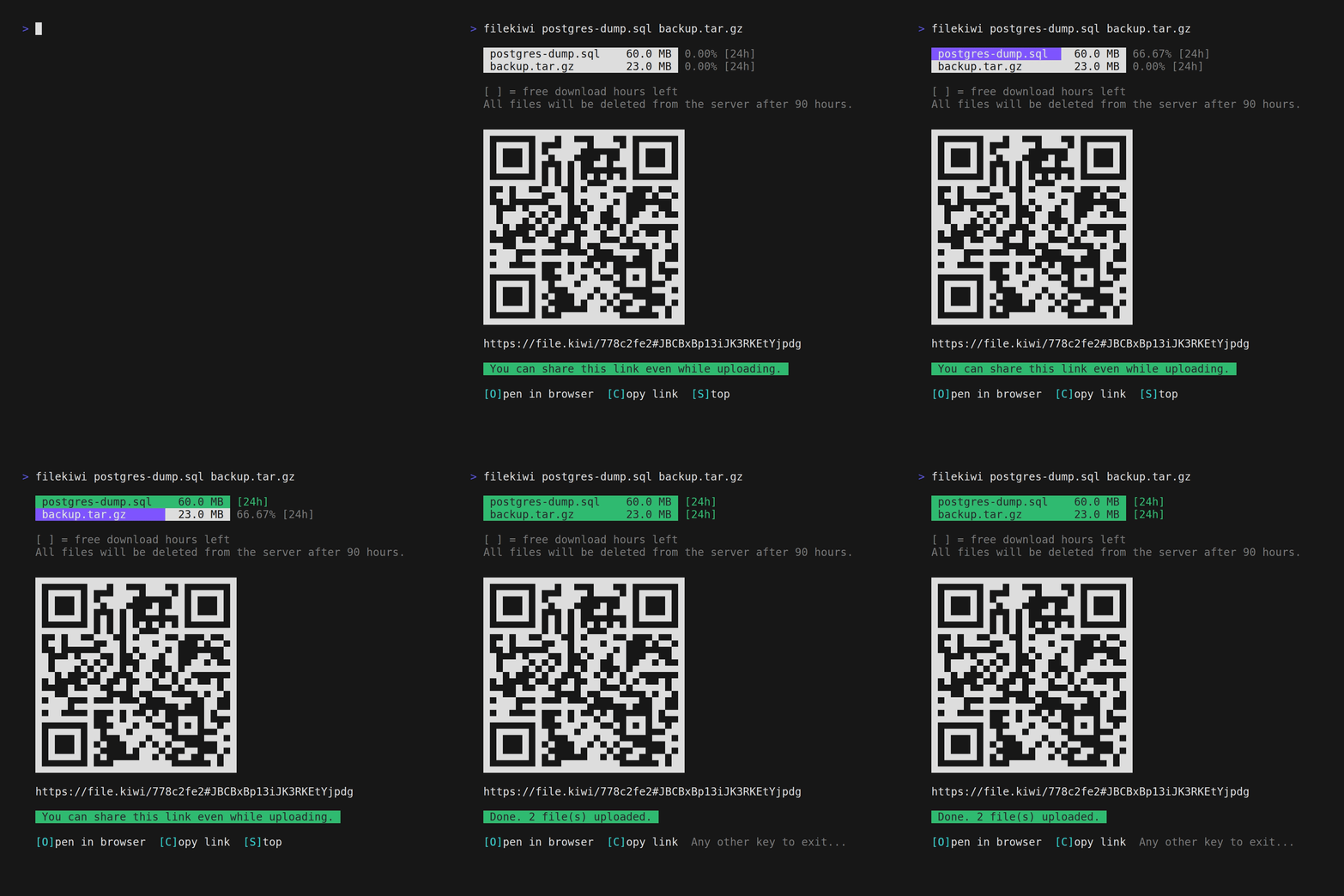
Node.js가 설치된 환경이라면 터미널에서 명령어 한 줄로 파일을 업로드하고 다운로드 링크를 받을 수 있습니다.
사전 준비
- Node.js 설치 필요
사용 방법
# 파일 업로드 (설치 없이 바로 실행)
npx @file-kiwi/node file1.txt file2.zip

# 제목 지정
npx @file-kiwi/node --title "프로젝트 자료" file1.zip file2.zip

# 중단된 업로드 이어하기
npx @file-kiwi/node --resume WEB_FOLDER_ID
전역 설치 후 짧은 명령어로도 사용할 수 있습니다.
npm install -g @file-kiwi/node
filekiwi file1.txt file2.pdf
실행 즉시 다운로드 링크가 출력되고, 파일별 업로드 진행 상황이 실시간으로 표시됩니다. 업로드가 중단되면 임시 파일(filekiwi.tmp.WEB_FOLDER_ID.json)이 남으며, --resume으로 이어서 올릴 수 있습니다.
- 용량 제한 없음
- 별도 로그인 불필요
- 종단 간 암호화 적용