
Bypass the Discord File Size Limit Without Nitro — Free Discord Bot, Unlimited Size
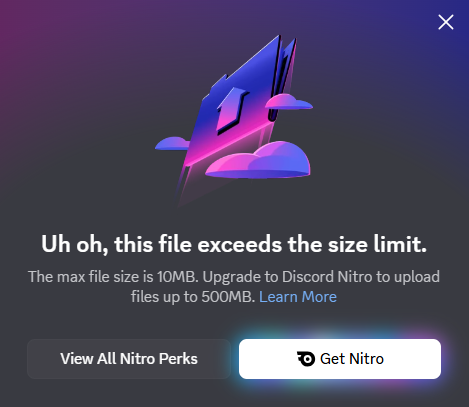
If you use Discord, the screen above is probably familiar. And yet most people who hit this limit don't end up paying for Nitro to fix it — not because $9.99/month feels too high, but because even Nitro doesn't actually let you send the kind of files most people are blocked on. The 500 MB Nitro ceiling still leaves you stuck on full game replays, design files, 4K clips, and large archives.
Quick reference — per-file upload cap by tier (source):
| Tier | Per-file limit | Monthly cost |
|---|---|---|
| Free | 20 MB | $0 |
| Nitro Basic | 50 MB | $2.99 |
| Nitro | 500 MB | $9.99 |
The Old Way — Cloud Storage Links
The familiar workaround is uploading to a cloud service — Google Drive, Dropbox, WeTransfer — and pasting the share link into Discord. Open another browser tab, upload the file, wait for it to finish, copy the link, switch back to Discord, paste. Everyone knows how to do it. Everyone also finds it tedious.
The New Way — file.kiwi Discord Bot
Add the File Sharing helper by file.kiwi bot to your server and the file size limit effectively disappears. It's listed in Discord App Discovery, already used by 6,400+ Discord servers, and stays entirely inside Discord — no external tabs, no signup, no Nitro.
Why this beats every other method:
- ✅ No 20 MB / 50 MB / 500 MB cap — share any file size, including 4K video, large ZIPs, and full PSDs
- ✅ No signup, no Nitro required
- ✅ Stays inside Discord — no external tabs, no Drive permissions, no link rot
- ✅ End-to-end encrypted, files auto-expire so nothing lingers on a server
- ✅ Works on free Discord accounts in any channel
- ✅ Recipients start downloading immediately — no waiting for your upload to finish
Step-by-Step: file.kiwi Discord Bot Setup (60-Second Guide)
Adding the bot to a server takes about 30 seconds, and sending your first file takes another 30. Here's the full flow.
Step 1 — Install the Bot from Discord App Discovery
Open the bot listing in Discord App Discovery.
Click the Add App button.
Pick one of the two install options shown below.
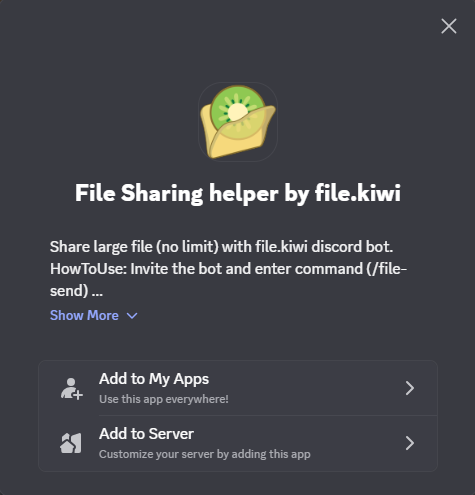
- Add to My Apps — installs to your own account. You can use
/file-sendin any channel or DM, no server admin permission needed. - Add to Server — installs to a server you manage; every member of that server can use the bot.
For most people Add to My Apps is the simplest path — install once, use everywhere.
Step 2 — Use the Slash Command in Any Channel
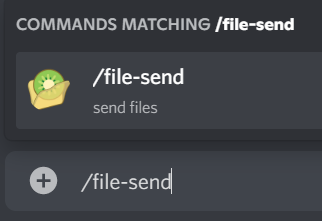
In any channel where the bot has access, type /file-send. Discord will autocomplete the command. Hit Enter, and the bot replies with an upload link.
Step 3 — Drop Your File and Share the Link
Click the upload link, drop your file in the browser tab, and the bot posts a shareable download URL right back into the Discord channel. Recipients click the link and download immediately — no signup, no waiting for your upload to hit 100% before the download can start.

That's it. Once the bot is installed, sending a 5 GB file is exactly the same as sending a 5 MB file: one slash command, one drop.
file.kiwi vs Other Methods — Comparison Table
| Method | File Size Limit | Cost | Stays in Discord |
|---|---|---|---|
| file.kiwi Discord bot ⭐ | Unlimited | Free | ✅ Yes |
| Discord Nitro | 500 MB | $9.99/mo | ✅ Yes |
| Discord Nitro Basic | 50 MB | $2.99/mo | ✅ Yes |
| Google Drive link | 15 GB free | Free (account) | ❌ No |
| WeTransfer link | 2 GB free | Free | ❌ No |
For most people the choice is straightforward: if you only occasionally hit the Discord file size limit and don't mind switching apps, a cloud link works. If you bump into the limit regularly, the file.kiwi bot is faster and cheaper than every paid tier — see our pricing page for the (very short) details.
Frequently Asked Questions
What is the maximum file size on Discord?
Discord's maximum file size is 20 MB for free users, 50 MB for Nitro Basic ($2.99/mo), and 500 MB for Nitro ($9.99/mo). To send larger files without paying, free tools like file.kiwi (which has a Discord bot) have no upload size limit.
How do I bypass Discord's 20 MB limit?
Two practical ways without paying:
- Install the file.kiwi Discord bot — free, no size cap, stays inside Discord.
- Upload to a cloud service (Google Drive, Dropbox, file.kiwi) and paste the share link.
Paying for Nitro just raises the cap to 500 MB — it doesn't actually remove the limit. The bot is the only option that gives you genuinely unlimited file size while staying in Discord.
Can I send 4K video on Discord without Nitro?
Yes. The free Discord file size limit caps you at 20 MB per file, which is far too small for any 4K clip. Use the file.kiwi Discord bot or upload the video to a cloud service and paste the link. file.kiwi keeps the original quality with no recompression — a 2 GB 4K MP4 stays exactly 2 GB.
Does Discord compress my videos?
Yes. Discord auto-compresses videos and images to keep them under the per-tier file size cap. That can visibly reduce quality, especially on 1080p or 4K clips squeezed under the 20 MB free limit. Sharing through the file.kiwi bot keeps the original file intact because the file is hosted externally and only a link sits in chat.
Is there a free alternative to Discord Nitro for uploads?
Yes — file.kiwi is a free file-sharing service with a Discord bot listed in App Discovery (used by 6,400+ servers). It has no file size limit, no signup, and it works inside Discord through a single slash command. If your only reason to consider Nitro was raising the upload cap, the bot makes Nitro unnecessary.
Did Discord raise the file size limit from 10 MB?
Yes. In 2026 Discord raised the free upload limit from 10 MB to 20 MB to reduce friction for larger files. This helps workflows with higher-resolution images and media; if you're still hitting this limit, file.kiwi remains the simplest way to share larger files.
Conclusion
The 2026 Discord file size limit is 20 MB free, 50 MB on Nitro Basic, and 500 MB on Nitro. None of the paid tiers actually remove the cap — they just raise it. If you need to send genuinely large files (long videos, full-resolution photo bundles, game replays, design files), the most efficient fix is the file.kiwi Discord bot: free, no signup, no size cap, and it lives inside Discord through one slash command.
Try it now: