
file.kiwi can recover stopped upload/download tasks.
Have you ever experienced a file upload that stopped working? In general, don't panic if you fail. Simply upload it again. However, when the file size becomes 5 GB, 10 GB, or 20 GB, it is not easy to upload it again. Even if 90% has been uploaded, you have to start again from 0%. You may end up wasting hours.
There are many reasons why file transfer operations may stop. The internet may be unstable, or the device may turn off due to low battery. If your Internet connection is lost once, there is a high probability that it will be broken again. If uploads keep failing due to an unstable network, you won't be able to escape the feeling of anxiety while uploading. Additionally, another common reason is human error. For example, the user forgets what is being uploaded and closes the window. This is because as file size increases and work time increases, interest in file transfer work decreases as other tasks take place. The stability of the Internet, the state of devices, and human error are all beyond our 100% control.
Therefore, it is best to prepare recovery methods in advance. So, many people are using the method of splitting files into several small files and sending them. Even if it fails in the middle, it does not start from the beginning and uses files that have already been transferred. However, splitting and merging files is very cumbersome. You will need a service that handles these tasks automatically.
Transfer and recovery of file.kiwi works exactly like this. Of course, users are not aware of this because this happens automatically within the service. If the transfer process is interrupted, file.kiwi will notice something different.
The screens below show the resume function that can be used when uploading fails.
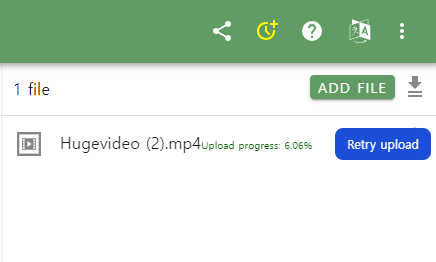
Even if the window is closed, you can continue the interrupted work using the above functions as long as you reconnect to the web folder address.
file.kiwi is designed for large file transfers. It doesn't just allow you to upload large files, it provides all the features to actually get the transfer done. If you need to send a large file, choose file.kiwi.